


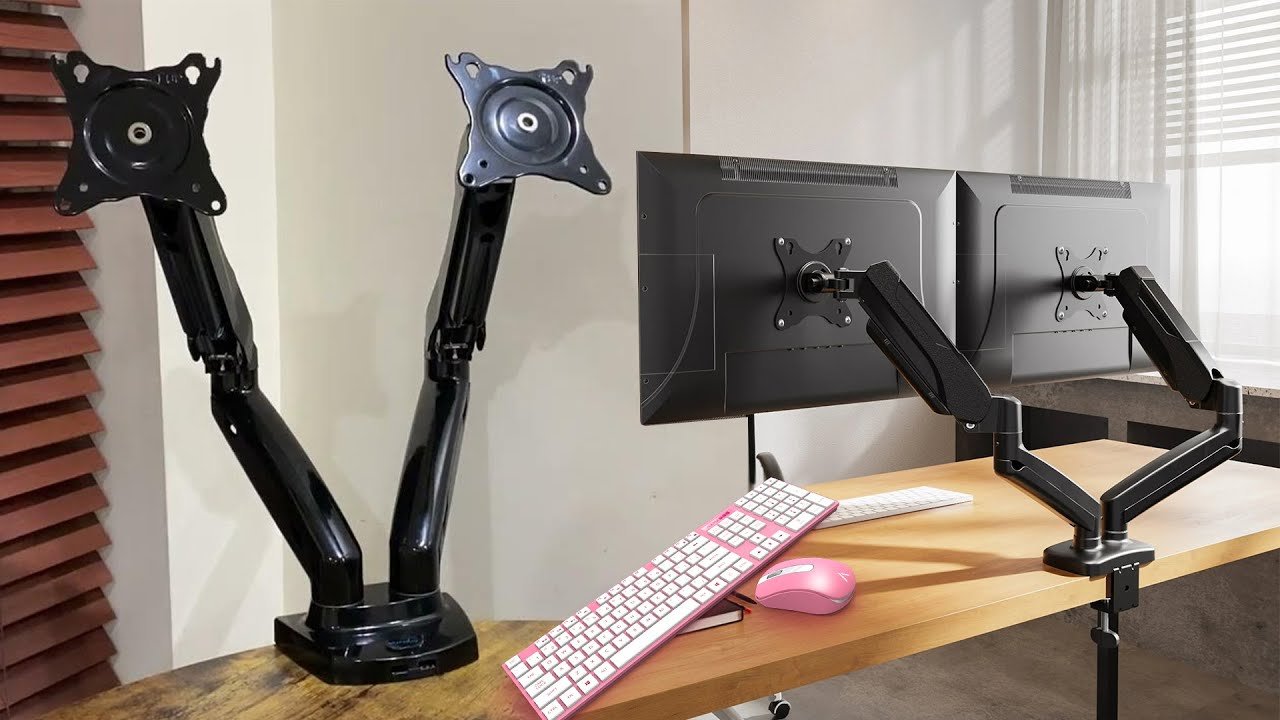
An adjustable monitor stand is a workstation accessory designed to raise, lower, tilt, swivel, or reposition a computer monitor for a more comfortable and flexible viewing experience. Unlike fixed monitor stands, adjustable models allow users to customize the screen position according to their height, desk setup, and working preferences.
Adjustable monitor stands are commonly used in home offices, professional workplaces, gaming setups, study areas, and creative workspaces. They can also help organize desk space while making it easier to create a more ergonomic computer workstation.
What Is an Adjustable Monitor Stand?
An adjustable monitor stand is a support system that holds a computer monitor while allowing its position to be changed. Depending on the model, adjustments may include height, tilt, swivel, rotation, or horizontal positioning.
Some stands use a traditional vertical column with adjustable mounting points, while others use a gas-spring arm that allows the monitor to move smoothly in multiple directions. Certain models are designed for one screen, whereas others can support two, three, or more monitors.
The primary purpose is to place the monitor at a suitable viewing position. A properly positioned display can make a workstation more comfortable and easier to use during extended computer sessions.
How Does an Adjustable Monitor Stand Work?
An adjustable monitor stand uses a mechanical structure to support and reposition a monitor. Depending on its design, the stand may use springs, hinges, height-adjustment columns, or articulated arms.
Many modern monitor arms use a gas-spring mechanism that helps balance the weight of the screen. This allows the user to raise, lower, tilt, or move the monitor with relatively little effort.
Other adjustable stands use manual knobs, locking mechanisms, or sliding brackets. The adjustment method varies according to the stand’s construction, monitor compatibility, and intended application.
Types of Adjustable Monitor Stands
Adjustable monitor stands come in several configurations, each designed for different workstation requirements. The best type depends on the number of monitors, available desk space, monitor size, mounting compatibility, and desired range of movement.
Height-Adjustable Monitor Stand
A height-adjustable monitor stand allows the screen to be raised or lowered along a vertical support. It is a straightforward option for users who mainly need to change the screen height.
This type can be useful in shared workspaces because different users can adjust the monitor to a preferred position. It is also suitable for desks where a monitor needs to be elevated without using a fully articulated arm.
Monitor Arm
A monitor arm provides a greater range of movement than a basic height-adjustable stand. Depending on the design, the arm can allow height adjustment, extension, retraction, tilting, swiveling, and screen rotation.
Monitor arms are particularly useful when desk space is limited because they can often be attached to the rear or edge of a desk. They can also make it easier to move a monitor out of the way when the workspace needs to be cleared.
Gas-Spring Monitor Arm
A gas-spring monitor arm uses internal spring assistance to make monitor adjustments smoother. The mechanism helps counterbalance the weight of the display while allowing the user to reposition it.
This design is popular among people who frequently change their monitor position. It can be especially useful in workstations that switch between different activities throughout the day.
Dual Monitor Stand
A dual monitor stand is designed to support two displays on a single mounting system. It can help create a cleaner multi-monitor workstation while allowing the screens to be positioned side by side.
Depending on the model, each monitor may have independent height, tilt, and rotation adjustments. This makes it easier to align two displays according to the user’s viewing preferences.
Triple or Multi-Monitor Stand
Multi-monitor stands are designed for workstations that require three or more displays. They are commonly used for professional applications such as financial analysis, video editing, programming, monitoring, and specialized control rooms.
Because multiple displays add considerable weight and require careful positioning, the stand should have sufficient weight capacity and a sturdy mounting system.
Freestanding Monitor Stand
A freestanding adjustable monitor stand rests directly on the desktop rather than attaching to the desk with a clamp or grommet. It can be a convenient option for users who do not want to permanently attach hardware to their desk.
These stands are also useful when the desk surface does not support clamp mounting. However, they generally require sufficient desktop space for their base.
Benefits of an Adjustable Monitor Stand
One of the biggest advantages of an adjustable monitor stand is the ability to customize screen placement. Instead of being restricted to the fixed position provided by a standard monitor base, users can change the height and angle of the display.
This flexibility can improve workstation organization and make it easier to create a comfortable computer setup.
Improves Monitor Positioning
An adjustable stand allows users to place the monitor at a more suitable height and viewing angle. This can help create a more natural screen position instead of forcing the user to adapt to a fixed stand.
The ability to adjust the display is especially useful when people of different heights share the same workstation.
Supports a More Ergonomic Workspace
Proper monitor positioning is an important part of an ergonomic computer workstation. An adjustable stand makes it easier to customize the display position alongside the chair, keyboard, and mouse.
The goal is to create a setup where the user can work comfortably without constantly adjusting their body to accommodate an incorrectly positioned screen.
Saves Desk Space
Monitor arms can free up valuable space underneath and around the display. Instead of occupying a large portion of the desk with a traditional monitor base, the screen can be supported by an arm attached to the desk.
The additional space can be used for a keyboard, notebook, speakers, accessories, or other equipment.
Makes Multi-Monitor Setups Easier
Adjustable stands can simplify the arrangement of multiple screens. Users can change the height, angle, and orientation of individual monitors to create a more consistent viewing area.
This is particularly useful when monitors have different sizes or are used for different tasks.
Provides Flexible Viewing Angles
Many adjustable stands allow monitors to tilt and swivel. Some also support 90-degree rotation, allowing a display to be used in portrait orientation.
These adjustments can be helpful for different activities. For example, portrait orientation may be convenient for reading long documents, coding, or viewing webpages.
Helps Keep the Desk Organized
A monitor stand can contribute to a cleaner and more organized workstation. Cable-management features on some models can also help route monitor cables along the support arm instead of leaving them loose across the desk.
A more organized desk can make it easier to access frequently used equipment and maintain a dedicated working area.
Common Uses of Adjustable Monitor Stands
Adjustable monitor stands are useful in many types of work and entertainment environments. Their flexibility makes them suitable for both simple single-monitor setups and complex multi-display workstations.
Home Office
In a home office, an adjustable monitor stand can help transform a basic desk into a more customizable workstation. Users can adjust the screen according to their chair height, desk dimensions, and preferred working position.
A monitor arm can also be useful when a small desk needs to accommodate additional equipment.
Professional Office
Businesses can use adjustable monitor stands to provide employees with more flexible workstations. They are especially useful in shared offices where different people may use the same desk.
The ability to adjust monitor height and viewing angle can also make workstation customization easier.
Gaming
Gamers often use adjustable monitor stands to position displays according to their preferred viewing distance and angle. Multi-monitor arms can also create an organized setup for gaming, streaming, and other computer activities.
Some stands allow the monitor to be moved closer during focused gameplay or pushed backward when additional desk space is needed.
Graphic Design and Creative Work
Designers, photographers, video editors, and other creative professionals may benefit from adjustable monitor positioning. A screen can be rotated or angled according to the type of content being reviewed.
Portrait orientation can be particularly useful for projects involving vertical layouts, documents, websites, or social-media content.
Programming and Development
Developers who work with large amounts of code may use multiple monitors to keep applications, documentation, terminals, and development environments visible simultaneously.
An adjustable multi-monitor stand makes it easier to align these displays and create a consistent viewing arrangement.
Adjustable Monitor Stand vs. Fixed Monitor Stand
The main difference between adjustable and fixed monitor stands is flexibility. A fixed stand generally keeps the monitor at one predetermined height and angle, while an adjustable stand allows the user to modify its position.
A fixed stand can be perfectly adequate for a simple workstation where the monitor already sits at a comfortable height. An adjustable model is more useful when the screen needs to be repositioned regularly or when multiple people use the same workstation.
Adjustable stands may cost more and can require additional installation, but their flexibility can make them worthwhile for users who prioritize workstation customization.
How to Choose an Adjustable Monitor Stand
Choosing the right adjustable monitor stand requires checking compatibility with the monitor and desk. One of the first things to consider is the monitor’s size and weight.
If the stand uses a mounting system, check whether the monitor supports the required VESA mounting pattern. The stand should also have a weight capacity that safely exceeds the weight of the display.
The desk itself is another important consideration. Clamp-mounted stands require an appropriate desk edge and sufficient thickness, while grommet-mounted models require a suitable hole through the desk.
The desired range of movement should also be considered. If you only need height adjustment, a simple vertical stand may be sufficient. If you want to frequently move the monitor forward, backward, sideways, or into portrait orientation, an articulated monitor arm may be a better choice.
Proper Setup of an Adjustable Monitor Stand
Installing an adjustable monitor stand correctly is important for stability and comfortable use. The base or mounting clamp should be securely attached to the desk before placing the monitor on the stand or arm.
After installation, adjust the monitor so that it can be viewed comfortably without repeatedly bending or extending the neck. The screen should also be positioned at an appropriate distance for the user’s normal working environment.
For dual or multi-monitor setups, align the screens carefully to avoid unnecessary differences in height or viewing angle. Cable-management channels can then be used to keep power and display cables organized.
Are Adjustable Monitor Stands Worth It?
An adjustable monitor stand can be a worthwhile investment for users who want greater control over their workstation. It can improve monitor positioning, free up desk space, simplify multi-monitor arrangements, and provide greater flexibility than a fixed stand.
However, not everyone needs an advanced monitor arm. If the existing monitor already sits at a comfortable height and does not need frequent adjustment, a simple fixed or height-adjustable stand may be sufficient.
The best choice depends on the monitor’s size, the desk configuration, the user’s working habits, and the amount of adjustment required.
Final Thoughts
An adjustable monitor stand is a practical workstation accessory that allows users to customize the height, angle, orientation, and position of their computer display. From simple height-adjustable stands to gas-spring arms and multi-monitor systems, there are options for a wide variety of setups.
By providing greater control over monitor placement, an adjustable stand can help create a more organized and adaptable workspace. Choosing a model with the right weight capacity, mounting compatibility, adjustment range, and desk attachment method is essential for building a stable and comfortable workstation.
