


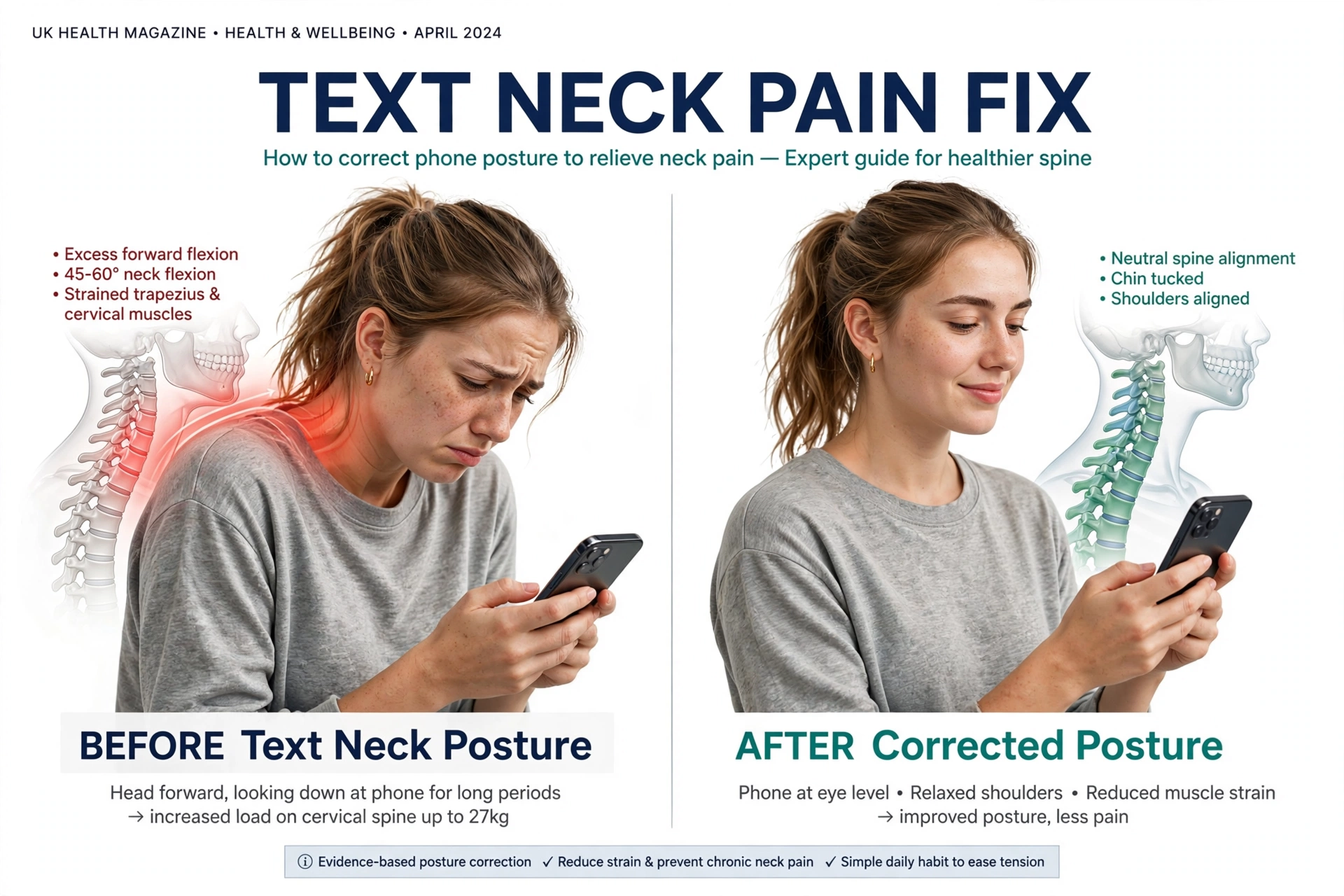
Text neck pain has become a common problem for people who spend long hours looking down at smartphones, tablets, and other digital devices. From scrolling through social media and answering messages to reading articles and watching videos, everyday phone use can contribute to neck stiffness, shoulder tension, and discomfort in the upper back.
The good news is that a few simple exercises may help reduce this discomfort and improve neck mobility. A five-minute text neck exercise routine can be an easy way to break up long periods of screen time, relax tight muscles, and encourage better posture throughout the day.
While no single movement suits every individual, gentle neck stretches, chin-tuck exercises, shoulder rotations, and upper-back mobility routines may help ease tension caused by spending extended periods using a phone. The key is to perform each movement slowly, avoid forcing your neck into uncomfortable positions, and take regular breaks from looking down at your screen.
What Is Text Neck?
Text neck refers to neck pain or stiffness that can develop from spending long periods looking down at smartphones and other portable electronic devices. It is not a specific medical diagnosis, but it describes symptoms that may include neck pain, shoulder tightness, upper-back discomfort, and stiffness after spending extended periods looking down at a screen.
When you tilt your head forward to view your phone, the muscles around your neck and shoulders must work to support your head in that position. Holding the same posture for a long time can increase muscular fatigue and discomfort, especially when you rarely change positions or take movement breaks.
Text neck can affect students, office workers, gamers, remote workers, and anyone who frequently uses a phone throughout the day. However, neck pain is not caused by posture alone, and factors such as stress, sleep quality, physical activity, and previous injuries may also contribute to symptoms.
Common Symptoms of Text Neck Pain
Recognizing the common symptoms of text neck can help you identify when your phone habits may be contributing to discomfort. Symptoms often develop gradually and may become more noticeable after long periods of texting, reading, gaming, or browsing on a mobile device.
Typical symptoms include a dull ache at the back of the neck, tight shoulders, stiffness when turning the head, discomfort between the shoulder blades, and tension around the upper back. Some people may also experience headaches associated with neck muscle tension.
These symptoms can have other causes, so persistent or severe pain should not automatically be attributed to smartphone use. Pain accompanied by arm weakness, numbness, tingling, or other unusual symptoms may require medical assessment.
5-Minute Text Neck Pain Relief Exercise Routine
This simple five-minute routine is designed for phone users who want to introduce gentle movement into their daily schedule. Perform the exercises in a comfortable position, keep your breathing relaxed, and stop any movement that causes sharp pain, dizziness, or worsening symptoms.
The routine does not require special equipment and can be performed at home, at work, or during a short break from screen time. If you have a recent neck injury, a known cervical spine condition, or symptoms that are getting worse, seek advice from a qualified healthcare professional before starting new exercises.
1. Chin Tucks — 60 Seconds
Chin tucks are a gentle movement that encourages the head to move backward without tilting it up or down. They can help you practise a more balanced head position after spending time leaning toward your phone.
Sit or stand comfortably with your eyes looking straight ahead and your shoulders relaxed. Slowly draw your chin backward, as if making a small double chin, while keeping your gaze level and avoiding any downward head movement.
Hold the position for approximately three to five seconds, then relax and return to your starting position. Repeat the movement slowly for about one minute, using a comfortable range of motion rather than forcing your head backward.
You should feel a gentle movement around the front and back of your neck, not sharp pain or pressure. If a movement triggers pain that radiates down your arm or causes a tingling sensation, discontinue the exercise and consult a qualified healthcare professional for guidance.
2. Gentle Neck Side Stretches — 60 Seconds
Neck side stretches can help reduce the feeling of tightness around the sides of the neck, particularly after long periods of holding your head in one position. They are simple to perform and can be included in a short movement break during the workday.
Maintain an upright seated posture, keep your shoulders loose, and gently lower your right ear toward your right shoulder in a slow, controlled movement. Keep your face pointing forward, and avoid lifting your shoulder to meet your ear.
Hold the gentle stretch for approximately 15–20 seconds, then return to the center and repeat on the left side. Complete another round if comfortable, allowing time to move slowly between sides.
Do not pull forcefully on your head with your hand or push through pain to achieve a deeper stretch. A mild stretching sensation is sufficient, and your range of motion may naturally vary from one side to the other.
3. Shoulder Rolls — 45 Seconds
Shoulder rolls help you move the muscles around your shoulders and upper back after prolonged sitting or phone use. Although they do not directly correct every cause of neck pain, they can provide a useful movement break and reduce the feeling of stiffness associated with remaining still.
Begin by sitting or standing in a comfortable position, allowing your arms to rest naturally by your sides. Slowly lift both shoulders toward your ears, move them backward, and lower them in a smooth circular motion.
Repeat the movement for approximately 20 seconds, then reverse the direction and roll your shoulders forward for another 20 seconds. Use the remaining time to relax your shoulders and return to a comfortable upright position.
Keep the movement controlled rather than exaggerated. If your shoulders are particularly tense, smaller circles may feel more comfortable and easier to perform consistently.
4. Shoulder Blade Squeezes — 60 Seconds
Shoulder blade squeezes encourage gentle movement of the muscles around your upper back and shoulder blades. They can be especially useful for people who spend much of the day sitting with their arms extended toward a keyboard or holding a phone in front of their body.
Sit or stand tall with your arms relaxed and your shoulders down. Gently draw your shoulder blades toward each other, as though trying to bring them slightly closer together, without arching your lower back or pushing your chest excessively forward.
Hold the contraction for three to five seconds, then release completely. Repeat at a comfortable pace for approximately one minute, focusing on smooth movement and relaxed breathing.
The goal is not to squeeze as hard as possible but to activate the muscles gently. Over time, combining this movement with regular breaks and general physical activity may help make prolonged sitting more comfortable.
5. Upper-Back Extension — 60 Seconds
Upper-back extension helps introduce movement into the thoracic spine, the section of the spine between your neck and lower back. This can be useful when you have been sitting with a rounded upper back while looking at your phone.
Sit in a stable chair with your feet flat on the floor and your hands resting lightly behind your head or across your chest. Keeping the movement gentle, lift your chest and allow your upper back to straighten slightly over the back of the chair, if the chair design allows it.
Hold for two to three seconds, then return to a comfortable neutral position. Repeat slowly for approximately one minute, avoiding excessive arching of your lower back or forcing your neck backward.
If your chair does not support this movement comfortably, simply sit upright and gently open your chest while drawing your shoulder blades slightly backward. The aim is to move comfortably rather than achieve the largest possible stretch.
How to Perform the 5-Minute Routine Safely
Consistency is more important than stretching aggressively or trying to eliminate all discomfort in a single session. Start with gentle movements and use a comfortable range of motion, especially if your neck feels stiff after a long day of screen use.
Breathe normally throughout each exercise and avoid holding your breath or making sudden movements. Mild tension may be normal during a gentle stretch, but sharp pain, increasing discomfort, dizziness, or symptoms spreading into the arms are reasons to stop.
You can perform the routine once or several times throughout the day, depending on your comfort and individual needs. If the exercises repeatedly aggravate your symptoms, stop and consult a healthcare professional rather than continuing to push through the discomfort.
Best Phone Posture to Prevent Text Neck
Bring Your Phone Closer to Eye Level
One of the simplest ways to reduce prolonged downward neck positioning is to raise your phone closer to eye level. Holding your device slightly higher can reduce the need to keep your head bent forward while reading messages, browsing websites, or watching videos.
Support your arms with a desk, cushion, or armrest when possible, since holding your phone high for long periods may create shoulder fatigue. Change positions regularly instead of trying to maintain one supposedly perfect posture throughout the day.
Take Regular Screen-Time Breaks
Remaining in the same position for extended periods can contribute to stiffness, regardless of whether your posture looks ideal. Brief movement breaks give you an opportunity to change your head position, relax your shoulders, and move your upper back.
Try interrupting long periods of phone use with short breaks to stand up, walk around, stretch gently, or look away from the screen. Setting a reminder on your smartphone can help you establish this habit when you are busy or focused on a task.
Adjust Your Sitting Position
When using your phone at a desk, sit comfortably with your feet supported and your shoulders relaxed. If you are reading for an extended period, consider using a stand or another stable support to reduce the need to hold your device in an awkward position.
Avoid remaining rigidly upright for hours in an effort to maintain perfect posture. Regularly changing positions and staying physically active are generally more practical than trying to keep your neck and back completely still.
Avoid Long Periods of Phone Use in Bed
Using a smartphone while lying on your side, propping your head at an awkward angle, or holding your neck forward for extended periods may contribute to discomfort. These positions can also make it harder to notice when your neck or shoulders are becoming tired.
If you use your phone in bed, choose a comfortable position that does not strain your neck and take breaks when needed. Reducing unnecessary screen time before sleep may also support better sleep habits, particularly when phone use keeps you awake longer than intended.
How Often Should You Do Text Neck Exercises?
For many people, a short routine can be a convenient starting point for managing mild neck stiffness associated with screen use. You can try the five-minute sequence during a morning break, between work sessions, or after a long period of reading on your phone.
There is no universally ideal number of repetitions or sessions for everyone. Start with a comfortable amount of movement and adjust according to how your neck responds over the following hours.
If your symptoms improve with gentle movement, regular breaks, and changes to your phone habits, continue using the routine as part of your daily self-care. If pain persists, repeatedly returns, interferes with sleep, or limits normal activities, arrange an assessment with a qualified healthcare professional.
Other Ways to Reduce Neck Pain from Phone Use
Exercise is only one part of managing neck discomfort. Improving your general activity level, taking regular breaks from sitting, getting adequate sleep, and managing stress may also help reduce the impact of prolonged screen use.
Strengthening exercises for the neck, shoulders, and upper back may be helpful for some people, but the best approach depends on the cause of the pain and your current physical condition. A physiotherapist can assess your movement and recommend exercises suited to your needs if simple stretches are not enough.
You may also benefit from reviewing your daily screen habits. Reducing unnecessary scrolling, using voice dictation for longer messages, and positioning your screen more comfortably can reduce the amount of time you spend holding your neck in one position.
When Should You Seek Medical Advice for Neck Pain?
Most mild neck stiffness associated with prolonged positioning can often be managed with gentle movement and changes to daily habits. However, not every case of neck pain is caused by smartphone use, and some symptoms require prompt medical attention.
Seek emergency care if neck pain follows a significant injury or occurs with sudden weakness, difficulty walking, loss of coordination, or other serious neurological symptoms. Neck pain accompanied by fever and a severe headache or marked neck stiffness also requires urgent assessment.
Arrange a medical evaluation if your pain persists for several weeks, keeps getting worse, interferes with daily activities, or is accompanied by persistent numbness, tingling, or pain travelling down an arm. Early assessment can help identify the cause and guide appropriate treatment.
Frequently Asked Questions About Text Neck Pain
Can text neck be fixed in five minutes?
A five-minute exercise routine may help relieve mild stiffness and encourage better movement, but it cannot guarantee that text neck pain will disappear in a single session. Results depend on the cause of the symptoms, their severity, and your everyday habits.
For lasting improvement, combine gentle exercises with regular movement breaks, comfortable phone positioning, and appropriate strengthening or rehabilitation when needed.
What is the best exercise for text neck?
Chin tucks are a common exercise used to practise a more balanced head position, while gentle neck stretches, shoulder rolls, and shoulder blade squeezes provide additional movement. No single exercise is best for everyone, so choose movements that feel comfortable and do not worsen your symptoms.
If a particular exercise causes pain or neurological symptoms, stop performing it and seek professional guidance.
Does looking down at a phone cause permanent neck damage?
Looking down at a phone does not automatically cause permanent neck damage. However, prolonged positions and repetitive screen habits can contribute to discomfort, muscular fatigue, and reduced tolerance for sustained activities in some people.
Taking breaks, varying your posture, and remaining physically active can help make phone use more comfortable. Persistent symptoms should be assessed rather than assumed to be harmless effects of screen time.
How can I prevent neck pain while using my smartphone?
Bring your phone closer to eye level when practical, support your arms, avoid prolonged static positions, and take regular movement breaks. Gentle neck and upper-back exercises may also help you manage stiffness associated with extended phone use.
Remember that comfortable posture is not about maintaining one rigid position all day. Frequent, relaxed movement is an important part of healthy screen habits.
Should I stretch my neck if it hurts?
Gentle movement may help some forms of mild neck discomfort, but the right approach depends on the cause of your pain. Avoid forceful stretching, sudden twisting, or exercises that increase your symptoms.
If the pain is severe, follows an injury, or occurs with weakness, numbness, dizziness, fever, or other concerning symptoms, seek appropriate medical advice before attempting a routine.
Conclusion: Take Five Minutes to Care for Your Neck
Text neck pain is a common concern for people who spend long periods using smartphones, but small changes to everyday habits can make a meaningful difference in comfort. A simple five-minute routine featuring chin tucks, gentle neck stretches, shoulder rolls, shoulder blade squeezes, and upper-back extension can help introduce movement into a screen-heavy day.
The most effective long-term strategy combines comfortable phone positioning, regular breaks, physical activity, and exercises suited to your needs. Rather than relying on a single stretch to solve every problem, focus on building habits that reduce prolonged stillness and help you move more comfortably.
Start with gentle movements, listen to your body, and make your screen habits work for you. If your neck pain persists or is accompanied by concerning symptoms, consult a qualified healthcare professional for an appropriate assessment and personalized guidance.
